Skip to Content

ERP E-commerce

Sell everywhere,
manage it in one ERP

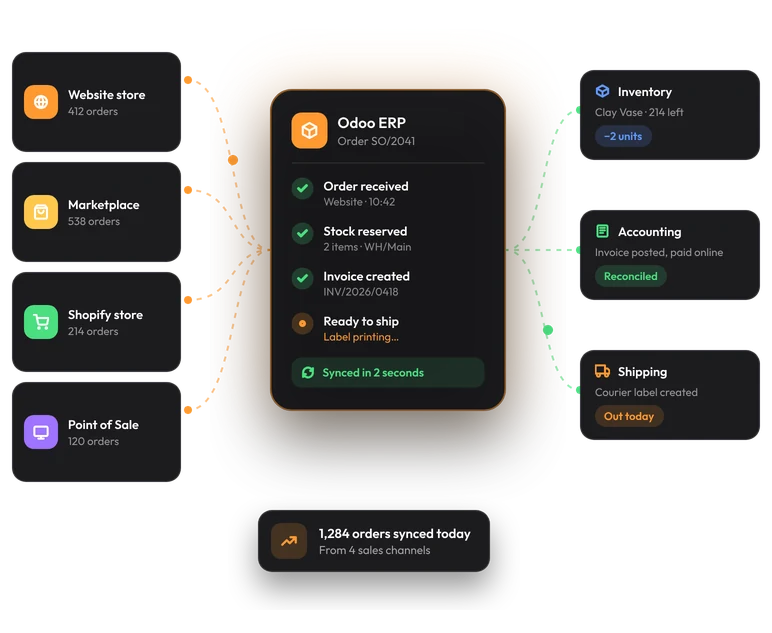
Connect your online store, marketplaces and shops to Odoo ERP. Every order updates stock, invoices and shipping automatically, with no copy-paste and no overselling.

Connect My Store
  • Real-time stock sync
  • Auto invoicing
  • Multichannel orders
Orders from a website store, marketplace, Shopify store and point of sale flowing into Odoo ERP, which updates inventory, accounting and shipping automatically

Connect Your Store
to Your Whole Business

We link your online sales to stock, accounting and shipping, so orders flow through the business on their own.

[ 01 ]

ERP-Integrated Online Store

An Odoo eCommerce store that shares products, prices and stock with your ERP from day one.

  • One product catalogue
  • Live stock on the website
[ 02 ]

Marketplace Integration

Orders from marketplaces like Amazon pulled into Odoo, with stock pushed back automatically.

  • Orders imported automatically
  • Stock synced to listings
[ 03 ]

Shopify & WooCommerce Connectors

Keep your existing store and connect it to Odoo for orders, stock and invoicing.

  • Keep your current store
  • Two-way order and stock sync
[ 04 ]

Order & Fulfilment Automation

Orders routed, picked, packed and shipped with fewer clicks and no re-typing.

  • Auto pick lists
  • Courier labels and tracking
[ 05 ]

Inventory & Warehouse Sync

One stock count across every channel and warehouse, so you never sell what you don’t have.

  • Multi-warehouse stock
  • Low-stock alerts
[ 06 ]

Accounting & Payments

Invoices created automatically and online payments matched to the right orders.

  • Automatic invoices
  • Payment reconciliation

One Click From Your Customer,
Everything Else Happens on Its Own

Here’s what happens behind the scenes when someone buys from any of your channels.

  1. Step 01

    Customer Orders

    On your website, a marketplace or in store.

    0 sec
  2. Step 02

    Stock Reserved

    Items held in the right warehouse instantly.

    2 sec
  3. Step 03

    Invoice & Payment

    Invoice created and payment matched.

    5 sec
  4. Step 04

    Picked & Shipped

    Pick list, label and tracking sent out.

    Same day
  5. Step 05

    Reports Updated

    Sales, stock and profit figures refresh.

    Real time

The Right Setup for
Where You Sell Today

Start with a new Odoo store, connect the one you already have, or bring every channel together.

Built on Odoo

New Odoo Store

A brand-new online store built on Odoo eCommerce, fully part of your ERP.

  • Custom store design
  • Products and stock from ERP
  • Payments and shipping set up

Best for: new or replacing stores

Build My Store
Most chosen
Website + marketplaces + POS

Multichannel Commerce

Every channel connected to one Odoo, with shared stock, pricing and reports.

  • Website, marketplaces and POS
  • One stock across channels
  • Combined sales reports

Best for: brands selling everywhere

Plan My Setup
Shopify · WooCommerce · Magento

Connect Existing Store

Keep the store your customers know and connect it to Odoo behind the scenes.

  • No change for customers
  • Orders flow into Odoo
  • Stock and prices synced

Best for: established online stores

Connect My Store

From Separate Tools
to One System

We connect one channel at a time and test real orders, so selling never stops during the setup.

Most setups take 4–10 weeks*Depends on the number of channels, products and warehouses.

Connect My Store
  1. Channel & Order Review

    Week 1

    We map every place you sell, how orders arrive and where they get stuck today.

    Sales channels Order flow
  2. Integration Plan

    Week 1–2

    Which data syncs where: products, stock, prices, orders, invoices and payments.

    Data mapping Fixed quote
  3. Catalogue & Stock Setup

    Weeks 2–4

    Products, variants, prices and warehouses set up once in Odoo.

    One catalogue Warehouses
  4. Connect Channels

    Weeks 4–8

    Store, marketplaces and POS linked to Odoo, one channel at a time.

    Connectors live Two-way sync
  5. Test Real Orders

    Before go-live

    Test orders from every channel run end-to-end before go-live.

    End-to-end tests Your sign-off
  6. Go-Live & Support

    Ongoing

    Live orders flowing into Odoo, with monitoring and support from our team.

    Live sync Ongoing support

A Standalone Store vs
an ERP-Connected Store

When your store runs on its own, your team fills the gaps by hand. Here’s what changes when it’s part of your ERP.

A standalone online store compared with an ERP-connected store
Area Standalone store ERP E-commerce by Mindphin
Stock levels Updated by hand, often wrong Live across every channel
Orders Copied into the ERP one by one Imported automatically
Invoices Created manually later Created the moment you sell
Payments Matched by the accounts team Reconciled automatically
Overselling Happens when stock is out of sync Prevented by shared stock
Reporting Exports stitched together One view of all channels

Ready to Connect Your
Store to Your ERP?

Tell us where you sell today. We’ll map how your orders, stock and invoices can flow through one system.

Let’s Get Started
  • Every channel in one placeWebsite, marketplaces and POS
  • No more manual re-typingOrders, stock and invoices synced
  • Support after launchMonitoring and help when you need it

Why Clients Trust Mindphin for Their Commerce

4.9 / 5

Rated for customer satisfaction, with 5-star reviews from Odoo clients on Upwork.

200+ Projects completed
22+ Countries served
20+ Odoo specialists
3 Offices: IN · CH · CA
Read our Upwork reviews

ERP E-commerce,
Answered

Common questions about connecting your online sales to Odoo ERP. Ask us anything else.

Ask Us Anything

It means your online store is connected to your ERP. Products, prices and stock come from one place, and every order automatically updates inventory, creates the invoice and starts shipping, without anyone re-typing it.

Yes. Your customers keep using the store they know, and we connect it to Odoo so orders, stock and prices sync in both directions behind the scenes.

Common ones include Amazon, eBay and Flipkart, and other marketplaces with an API can be connected too. Orders come into Odoo and stock is pushed back to your listings automatically.

Every channel reads stock from the same place in Odoo. When something sells anywhere, the quantity updates across your website, marketplaces and shops, so you don’t sell items you don’t have.

Yes. Odoo tracks stock per warehouse, and orders can be routed to the right one by rules such as location or availability, with stock shown correctly on each channel.

Most setups take 4–10 weeks, depending on the number of channels, products and warehouses. We connect one channel at a time, so you keep selling throughout.

Your Next Business Improvement Starts With One Conversation

Let’s understand where your business is today, explore what’s possible with Odoo, and find the right way forward.